
JOY OF PROGRAMMING Turns Python Into Pure Power in This Automation Adventure
Diving into JOY OF PROGRAMMING feels like stepping into a humming digital workshop where every machine, drone, and algorithm waits for your command. This in‑depth exploration quickly reveals a world built on precision, experimentation, and the thrill of watching real Python code reshape intricate systems. Whether you’re automating logistics, steering self-driving vehicles, or cracking security puzzles, the game’s tactile, engineering-first design pulls you into a rhythm of creation and discovery that’s as satisfying as it is challenging.


JOY OF PROGRAMMING Software Engineering Simulator Review Pros:
- The game has graphics, some visual and some just code.
- 9.12GB download size.
- Steam achievements.
- Two launch options – DX12 and DX11.
- Video settings – resolution, video mode, resolution quality, fps limit, overall quality, and v-sync.
- Audio sliders for – Ambient, SFX, UI, music, and master volume.
- Keyboard settings – You can remap the controls, Invert axis and sensitivity sliders, mouse lock, and edge scrolling.
- The level editor is an advanced mode where it is all code driven and let’s you create scripts, and entities.
- Fact sheets are a central menu for all commands, controls, and anything code-related. The cool part is that every entry has a web link and a YouTube video link, so you can get all the information.
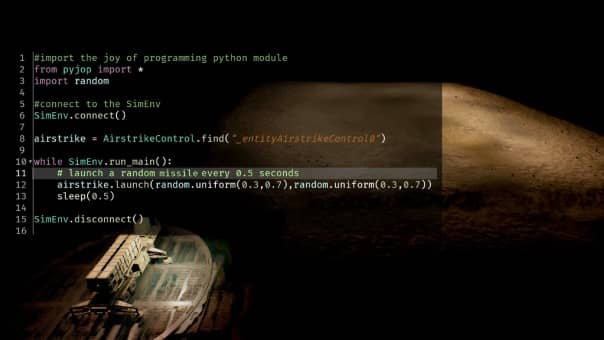
- Really cool loading screens where it’s code scrolling down the screen, the load times are fast aswel.
- The whole game is using the coding language PYTHON.
- Code programme based gameplay.
- Tutorial section and factsheets to help. The tutorials are pop-ups as you play.
- Your work environment, in many cases are 3D, and you can fully rotate and zoom the camera in and out.
- The game introduces the code slowly by having you do simple UI based commands but as you highlight the command you see the code as a pop up. You then go to how to read scripts and get example commands, and then it builds and builds.
- Every tutorial is replayable.
- Stars are earned by finishing levels.
- Levels are scenarios, and they are in groups, so things like military, movement, etc.
- You have speed control,s so if you are building something with movement, you can have it go faster without coding.
- I really like the presentation of it all, having a list of tasks on the side tick off as you do them helps, every task is well explained, and it shows a percentage complete counter.
- On screen, you can drag and drop the many windows around and make it your way.
- It’s a game that does feel like work but also like a game, it’s a weird one, as it has you learning without realising it so many times.
- I found it to be a real good resource for getting the basics of Python nailed down. I’m not ready to re-code the worl,d but I feel more confident looking at scripts and why you use Python.
- The hover over any significant code feature is an amazing feature as it helps me take in more information than I normally would.
- The game does not rush you at any point; you can and will take it at your own speed.
- The scenarios are plentiful and varied; it’s a great way to try Python puzzle solving in a variety of environments.
- Any coding you do is in-game only, so don’t worry about messing anything up.


JOY OF PROGRAMMING Software Engineering Simulator Review Cons:
- I wish for all the Python that you would have cool pieces on the history of the language and how it is used in today’s world.
- No controller support, obvious, but I am consistent, so deal with it.
- No Colourblind support, so I don’t know how this could affect some code colour elements.
- It is a huge ask of a game or experience. You are always learning so progress will be slow and information will be plentiful.
- I couldn’t see any way to share level creations, I mean, I never would cos you know I’m dumb, but I couldn’t see an option.
- Performance at times chugged a bit, especially on later scenarios.
- It’s not all informational, as at times I still felt like I didn’t understand something, or the game just assumed I knew something.
Related Post: Moons Of Darsalon Review (Xbox Series S)

JOY OF PROGRAMMING Software Engineering Simulator:
Developer: Prof. Scherer
Publisher: PlayWay
Store Links –
JOY OF PROGRAMMING Software Engineering Simulator Review
Summary
JOY OF PROGRAMMING Software Engineering Simulator The Thrills and Highlights of Gameplay:
The game has graphics, some visual and some just code. It uses the coding language PYTHON and is fully code programme based. The level editor is an advanced mode where it is all code-driven and lets you create scripts and entities. Fact sheets act as a central menu for all commands, controls, and anything code related, with every entry having a web link and a YouTube video link. Tutorials and fact sheets help, with tutorials appearing as pop ups as you play. The game introduces the code slowly with simple UI based commands, showing the code as a pop-up, then moving into reading scripts and example commands as it builds. Your work environments are 3D with full camera rotation and zoom. Stars are earned by finishing levels, and levels are scenarios grouped into things like military and movement. You have speed controls, drag and drop windows, and a list of tasks that tick off as you do them with a percentage complete counter. It feels like work but also like a game, helping you learn without realising it. It is a real good resource for getting the basics of Python nailed down and helps build confidence in looking at scripts. Hovering over code features helps take in more information. The game never rushes you, and scenarios are plentiful and varied. Any coding you do is in-game only.
JOY OF PROGRAMMING Software Engineering Simulator Where It Falls Short Key Negatives:
There is no controller support and no Colourblind support. There is no cool history of the Python language or how it is used in today’s world. It is a huge ask as you are always learning, progress will be slow, and information will be plentiful. There was no way to share level creations. Performance at times chugged on later scenarios. At times it still felt like something wasn’t understood or the game assumed knowledge.
JOY OF PROGRAMMING Software Engineering Simulator Visual and Performance Aspects:
The game has graphics, some visual and some just code. The download size is 9.12GB. There are two launch options, DX12 and DX11. Video settings include resolution, video mode, resolution quality, fps limit, overall quality, and v sync. Audio sliders include Ambient, SFX, UI, music, and master volume. Keyboard settings allow remapping, invert axis, sensitivity sliders, mouse lock, and edge scrolling. Loading screens show code scrolling down the screen, and load times are fast. Performance at times chugged on later scenarios.
JOY OF PROGRAMMING Software Engineering Simulator Overall Verdict Is It Worth Playing: The game mixes graphics, code, tutorials, scenarios, and Python learning in a way that feels like work but also like a game. It helps nail down Python basics, builds confidence in reading scripts, and offers varied scenarios and replayable tutorials. It also has limitations such as no controller support, no Colourblind support, slow progress due to constant learning, and performance dips. It is a huge ask, but also a useful resource for understanding Python.
Back of the Box Quotes:
Python learning wrapped inside genuine gameplay
