
Moldwasher Is A Chilled-Out Pixel Cleaner Until the Aggressive Mold Drives You Explicitly Insane
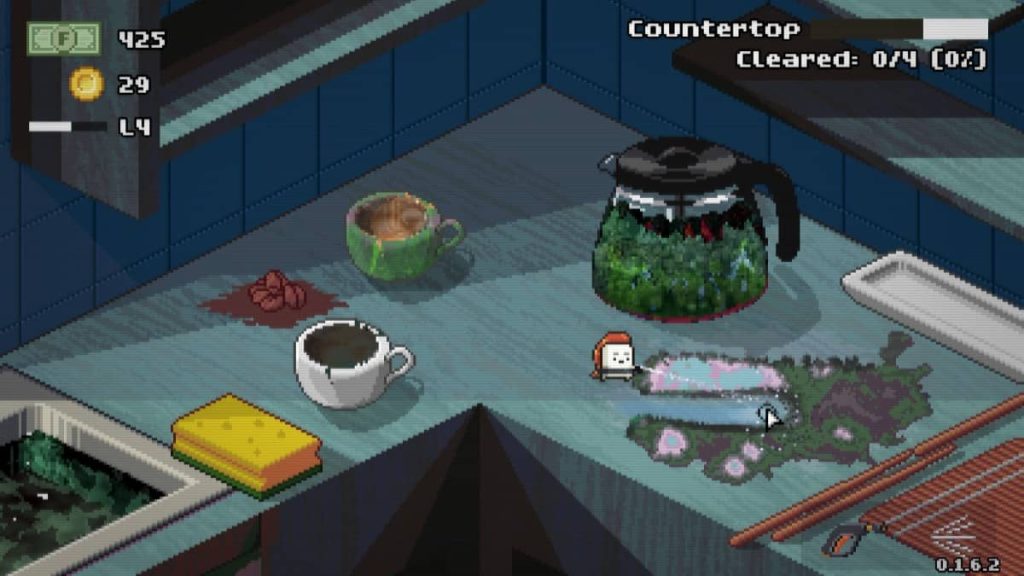
Moldwasher immediately hooks you into its cosy, visually striking world with some of the most awesome pixel art graphics you will lay your eyes on. The entire vibe screams relaxing satisfaction as you set out to purge filth from various kitchen appliances and locations, watching dirt vanish before your eyes. It sets up a brilliant, loop-driven gameplay hook where expanding your personal bedroom sanctuary with trinkets and satisfyingly scrubbing down grime keeps you totally glued to the screen. But beneath that charming aesthetic lies an unforgiving, hidden mechanic that completely upends the cosy pacing and transforms a peaceful cleaning session into pure chaos.
QUICK NAV: [Specs] [Gameplay] [Performance] [Settings]

Moldwasher Steam Review
- Developer: Developer Website
- Publisher: Publisher Website
- Official Game Page: Official Game Website
- Steam Store Link: Moldwasher on Steam
- Download Size: 518.74MB download size.
- Achievements: Full Steam achievements supported.
- Progression Economy: Earn coins by finding them and then cleaning them to buy new tools, stickers, and trinkets, or upgrade your existing gear.
- Hub Space: Your room can be extended and serves as a place to position stickers and trinkets bought or found, including a gacha machine for random sticker drops.
- Media Room Elements: Features a functional VHS player and CD stack stereo in your room to play videos and CDs.
- Map Selection: The map selection screen lets you choose your destination, highlights the specific tool required to finish the level, and lets you replay older levels.
- Bonus Levels: The garage opens up periodically, offering bonus toys to clean and a massive load of rewards.
Moldwasher Steam Review
It is incredibly relaxing and satisfying to see the mould disappear as you watch your progress climb, using a handy button that shows exactly where the dirt is hiding alongside a progress meter for each element needing a scrub. Once a section has been completely sanitised, the dirt patch will flash and make an audible noise to let you know it is done. You get a total of seven tools to swap between, ranging from different washer styles to pickaxes for dealing with caked-on mould, and even a blower to clear away loose debris like rice. You can upgrade each tool’s range, power, and radius using your hard-earned coins, swapping them on the fly using either the mouse wheel or a quick tool radial menu. The core loop of cleaning appliances and kitchen spaces feels fantastic at first, offering a tangible sense of order as you scrub everything clean.
The crushing problem is that the game completely hides the fact that the mould can and will grow back, spreading incredibly quickly to the point where it completely breaks the relaxing vibe and leaves me rage-quitting levels because I could never get the upper hand. The level design actively fights you too, because some locations feature objects like a box where you need to clear rice, but the box refuses to move or go transparent, reducing the gameplay to a blind, frustrating pixel hunt where you are perpetually falling behind the mould growth. To make matters worse, you get absolutely zero help regarding where to put things or what to do; one level tasks you with filling bags and emptying them, but at no point does the game tell you how to take the bags or where to take them. When the frustration peaks, the map system traps you; clicking the map just forces you right back into the exact level you were suffering through, with no menu options to back out, meaning I had to physically quit the entire game to the desktop and reboot it just to escape.
Moldwasher Steam Review: Performance & Fidelity
- Graphics Style: Awesome pixel art graphics that look incredibly charming across every kitchen appliance and room layout.
- Visual Feedback: Cleaned sections flash visually and play a distinct sound cue upon completion, though foreground objects frustratingly fail to go transparent when blocking dirty areas.
- UI Elements: Includes a dedicated dirty-radar button to highlight hidden spots alongside clear individual element progress meters.
Settings, Customisation & Control Details
- Controller Support: Full controller support with built-in settings to adjust the speed of the cursor.
- Keyboard & Mouse: Supports play with a mouse and keyboard natively.
- Remapping Limitations: There is absolutely no way to remap controls within the settings menus.
- Tool Selection Methods: Dual input options allow switching tools via the mouse wheel or through a dedicated tool radial menu.

Related Gert Lush Gaming Reviews
Moldwasher Steam Review
Summary
What Makes Moldwasher Worth Playing?
The game is a charming little experience on the surface, offering an incredibly relaxing and satisfying loop where you watch your progress tick up as the dirt disappears. The awesome pixel art graphics make every single appliance and room look brilliant, and the visual feedback is top-tier, with dirt patches flashing and making a lovely noise once they are fully cleared. Managing your tools is great fun, letting you upgrade seven distinct cleaning instruments from heavy pickaxes to debris blowers using a handy tool radial menu or your mouse wheel. Plus, the progression outside of the jobs is genuinely engaging, giving you a garage that opens up for bonus toy cleaning rewards, and an expandable bedroom hub where you can spin a gacha machine for stickers, decorate your walls, and play videos or tunes via a working VHS player and CD stereo stack.
The Biggest Frustrations In Moldwasher
The absolute killer here is a massive, unannounced mechanical twist: the mould can and will grow back, spreading so quickly that it completely ruins the zen pacing and left me rage-quitting levels because it is impossible to get the upper hand. The level design turns into a miserable pixel hunt because large objects like boxes don’t go transparent when you need to clean behind them, completely blinding you to the dirt. Guidance is completely non-existent, leaving you entirely in the dark on basic level mechanics, like forcing you to fill up bags without ever explaining how or where you are supposed to empty them. To cap off the sheer irritation, the game lacks a basic option to quit an active level from the map screen, forcing me to completely shut down the entire game to the desktop and boot it back up just to escape a broken stage.
Moldwasher Overall Verdict: Is It Worth Playing?
Moldwasher serves up so many genuinely great ideas, but the basic structural execution holds it back from being the cosy classic it wants to be. The pairing of beautiful pixel art with a rewarding upgrade loop creates an excellent foundation that is unfortunately ruined by hyper-aggressive mould regrowth and clunky, non-transparent level boundaries. Having to completely reboot the software just to back out of a level shows a frustrating lack of polish in the user interface. It is a real shame, because the satisfying crunch of upgrading your tools and collecting gachapon stickers is severely undermined by a design that constantly forces you into a stressful, blind pixel hunt.
